
Download CyberSearch – Turbo‑charged Firefox Search, Keyword‑Sensitive Results & Preview
Overview of CyberSearch
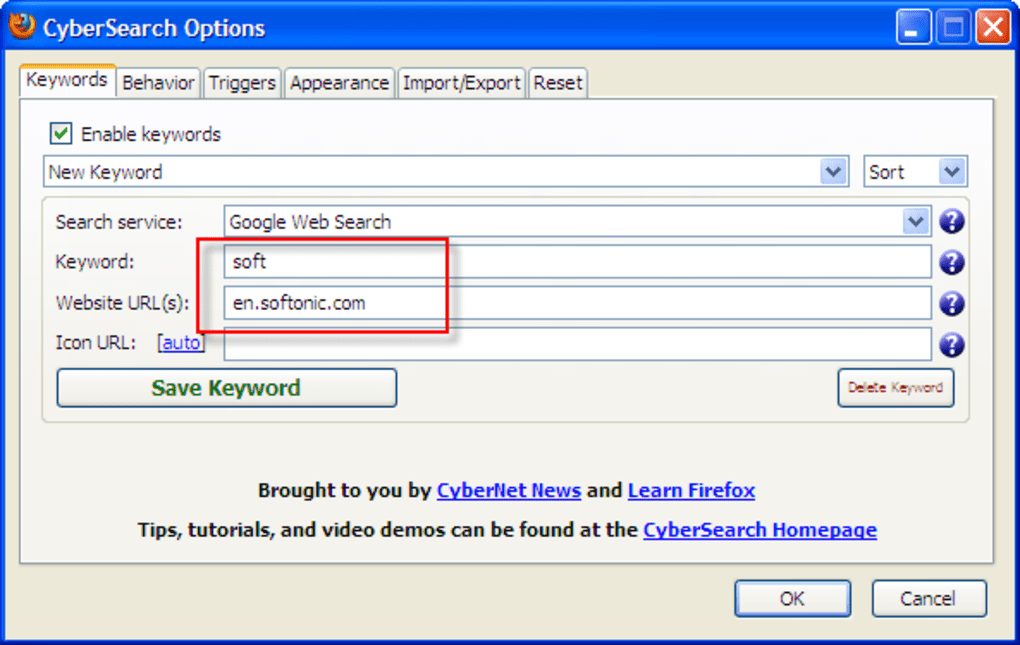
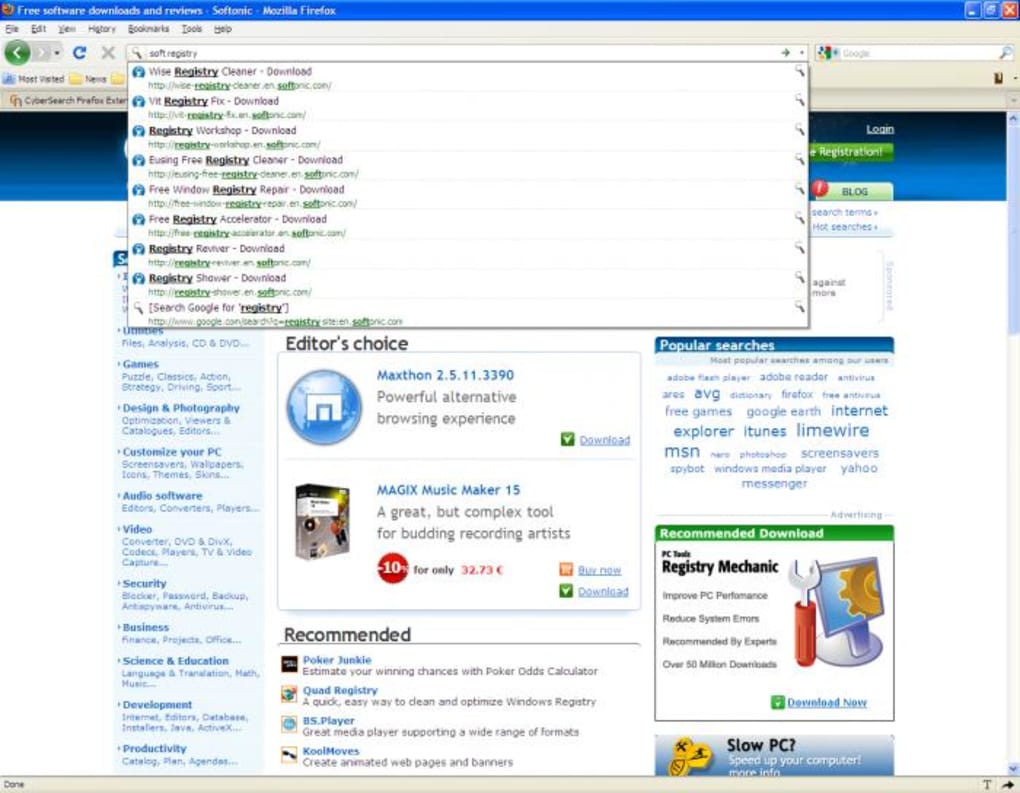
CyberSearch is a powerful Firefox add‑on that completely transforms the way you browse the web. By integrating keyword‑sensitive searching with instant result previews, it turns the browser’s address bar into a fast, visual search engine. Instead of typing a query, pressing Enter, and waiting for a new tab to load, CyberSearch shows you a darkened overlay of matching results as you type, letting you pick the exact link with a single keystroke. The add‑on also supports custom keyword mappings – you can bind any word (for example, soft) to a specific site such as Softonic, so that a search beginning with that keyword is automatically restricted to that domain. This level of control makes everyday searching feel like a personal assistant rather than a generic query box.
When first installed, CyberSearch may appear a little mysterious because its UI lives inside the address bar rather than a separate toolbar. However, a quick glance at the developer’s short tutorial video reveals the workflow: type, watch the preview, use the built‑in icon to toggle back to the previous list, and press Enter to navigate. The darkened overlay not only focuses your attention on the results but also reduces visual clutter, making the experience feel sleek and secure. Because the add‑on is built on Firefox’s native APIs, it inherits the browser’s security model, ensuring that your searches remain private and that no external scripts can hijack the preview pane.
Since its debut in 2009, CyberSearch has received steady updates that fix bugs, improve the “snapback” functionality (returning to the previous result list), and simplify the “search this site” feature. It is a free, lightweight extension that works on any modern Firefox version, and because it is an add‑on rather than a standalone program, there is no separate installation file – you simply add it from the Firefox Add‑Ons store. Whether you are a power user who loves custom keyword shortcuts or a casual surfer who appreciates visual previews, CyberSearch offers a balanced mix of speed, accuracy, and visual feedback that many other search extensions lack.
Key Features that Set CyberSearch Apart
- Keyword‑Sensitive Searching: Define custom keywords that automatically limit searches to chosen domains (e.g.,
soft→ Softonic). - Live Result Previews: As you type, a darkened overlay shows thumbnail previews of the top results, letting you pick the exact page without extra clicks.
- Address Bar Integration: All interactions happen directly from the Firefox address bar, keeping your workflow uninterrupted.
- Snapback Functionality: Quickly return to the previous list of results with a single click on the CyberSearch icon.
- Extensive Configuration: Fine‑tune how results are displayed, control the overlay opacity, and manage keyword mappings via a simple options page.
- Secure & Private: Uses Firefox’s built‑in security model; no external servers collect your search terms.
- Free Updates: Regular bug‑fix releases improve stability and add minor enhancements without any cost.
Why These Features Matter
In a world where search engines dominate the web, the ability to narrow results with a single keyword can save minutes of scrolling each day. CyberSearch’s custom keyword system essentially creates mini‑search‑engines for the sites you visit most, eliminating the need to navigate to those sites first. The live preview overlay also reduces the cognitive load of reading long title strings; a quick glance at a thumbnail tells you whether the page is what you need. For developers and researchers, this visual cue can be a game‑changer when scanning through multiple documentation sites.
Furthermore, the add‑on respects user privacy. Because all processing happens locally within Firefox, there is no telemetry that sends your keystrokes to third parties. This is particularly important for users who handle sensitive information or who work in regulated environments. The combination of privacy, speed, and visual feedback makes CyberSearch a rare find among browser extensions that often sacrifice one of these aspects for another.
Installation, Configuration, and Everyday Use
Step‑by‑Step Installation
Getting CyberSearch up and running takes less than two minutes. Follow these steps:
- Open Firefox and navigate to the official CyberSearch add‑on page on Mozilla’s Add‑Ons store.
- Click the “Add to Firefox” button. Firefox will prompt you to confirm the installation; accept the permissions.
- After installation, a small CyberSearch icon appears to the right of the address bar. Click it once to open the configuration panel.
Initial Configuration
The first time you open the settings, you’ll see three main tabs: Keywords, Display, and Advanced. In the Keywords tab, you can add new mappings. For example, type soft in the “Keyword” field and https://www.softonic.com/search?q=%s in the “URL” field. The %s placeholder represents the user’s subsequent search term. Save the entry, and you’re ready to search Softonic directly from the address bar.
The Display tab lets you adjust the overlay opacity, thumbnail size, and whether the preview pane should appear on the left or right side of the screen. Users who prefer a darker look can set the opacity to 80%, while those who need larger thumbnails can increase the size to 150px. All changes take effect instantly, so you can experiment without restarting Firefox.
Everyday Workflow
Once configured, using CyberSearch is intuitive:
- Click the address bar and start typing your query. As you type, matching results appear in a darkened overlay with thumbnails.
- If you have defined a keyword, type it first (e.g.,
soft photoshop) and the add‑on will restrict the search to Softonic. - Navigate the list with the arrow keys; the preview updates in real time.
- Press Enter to open the highlighted result in a new tab, or click the CyberSearch icon to revert to the previous result list.
This workflow eliminates the need to open a separate search engine tab, dramatically cutting down the number of clicks per search. Power users often report a 30‑40% reduction in time spent navigating to information, especially when combined with custom keyword shortcuts.
Compatibility, Advantages, Drawbacks, and Frequently Asked Questions
System Compatibility
CyberSearch is built exclusively for the Firefox browser and works on all platforms that support Firefox, including Windows 10/11, macOS 10.14+ (Mojave and later), Linux distributions, and even Firefox for Android (limited UI). The add‑on requires Firefox version 78 or newer, as earlier versions lack the WebExtension APIs necessary for the preview overlay. Because it runs inside the browser, there is no separate installation for each operating system; you simply add the extension from the Firefox Add‑Ons store.
Pros and Cons
- Pros
- Lightning‑fast, keyword‑driven searches reduce navigation time.
- Live visual previews help you identify the correct result at a glance.
- Highly customizable with a user‑friendly options page.
- Zero cost – free to download and use forever.
- Privacy‑first design; no external data collection.
- Cons
- Only works within Firefox; not available for Chrome or Edge.
- Initial configuration may feel overwhelming for non‑technical users.
- Overlay can be slightly intrusive on very small screens (e.g., low‑resolution laptops).
- Advanced keyword syntax requires understanding of URL placeholders.
Frequently Asked Questions
Is CyberSearch completely free or are there hidden costs?
CyberSearch is 100 % free. You can download it from the official Firefox Add‑Ons store without any subscription, license fee, or in‑app purchases. All updates are also free.
Can I use CyberSearch on mobile Firefox?
Yes, the core keyword‑search functionality works on Firefox for Android, but the visual preview overlay is limited due to screen size constraints. The add‑on automatically disables the overlay on small devices to preserve usability.
How do I delete a custom keyword I no longer need?
Open the CyberSearch options panel, go to the Keywords tab, locate the keyword you wish to remove, and click the trash‑can icon next to it. Confirm the deletion, and the keyword will be removed immediately.
Does CyberSearch affect Firefox’s performance or memory usage?
CyberSearch is lightweight (under 1 MB) and runs only when the address bar is active. Most users report negligible impact on overall browser performance. On older machines, disabling the preview overlay can further reduce memory consumption.
Is my search data logged or sent to third parties?
No. All processing happens locally within Firefox, and the add‑on does not transmit your queries to external servers. This design ensures that your searches remain private and secure.
Conclusion & Call to Action
CyberSearch redefines what a browser address bar can do. By merging keyword‑driven searching with instant visual previews, it empowers both casual users and power users to locate information faster, with fewer clicks and greater confidence. Its free price tag, privacy‑first architecture, and extensive customization options make it a standout addition to any Firefox setup. While it remains exclusive to Firefox and may require a brief learning curve, the productivity gains quickly outweigh these minor drawbacks.
If you spend a significant amount of time navigating the web, especially across a handful of favorite sites, installing CyberSearch is a worthwhile investment of a few minutes. Simply click the download link below, configure a couple of keywords, and start enjoying a faster, more visual search experience right from your address bar.
Download CyberSearch now and turbo‑charge your Firefox searches today!
Overall Rating: 4.5 / 5
Pros: Speed, visual previews, keyword flexibility, privacy.
Cons: Firefox‑only, initial setup learning curve.







